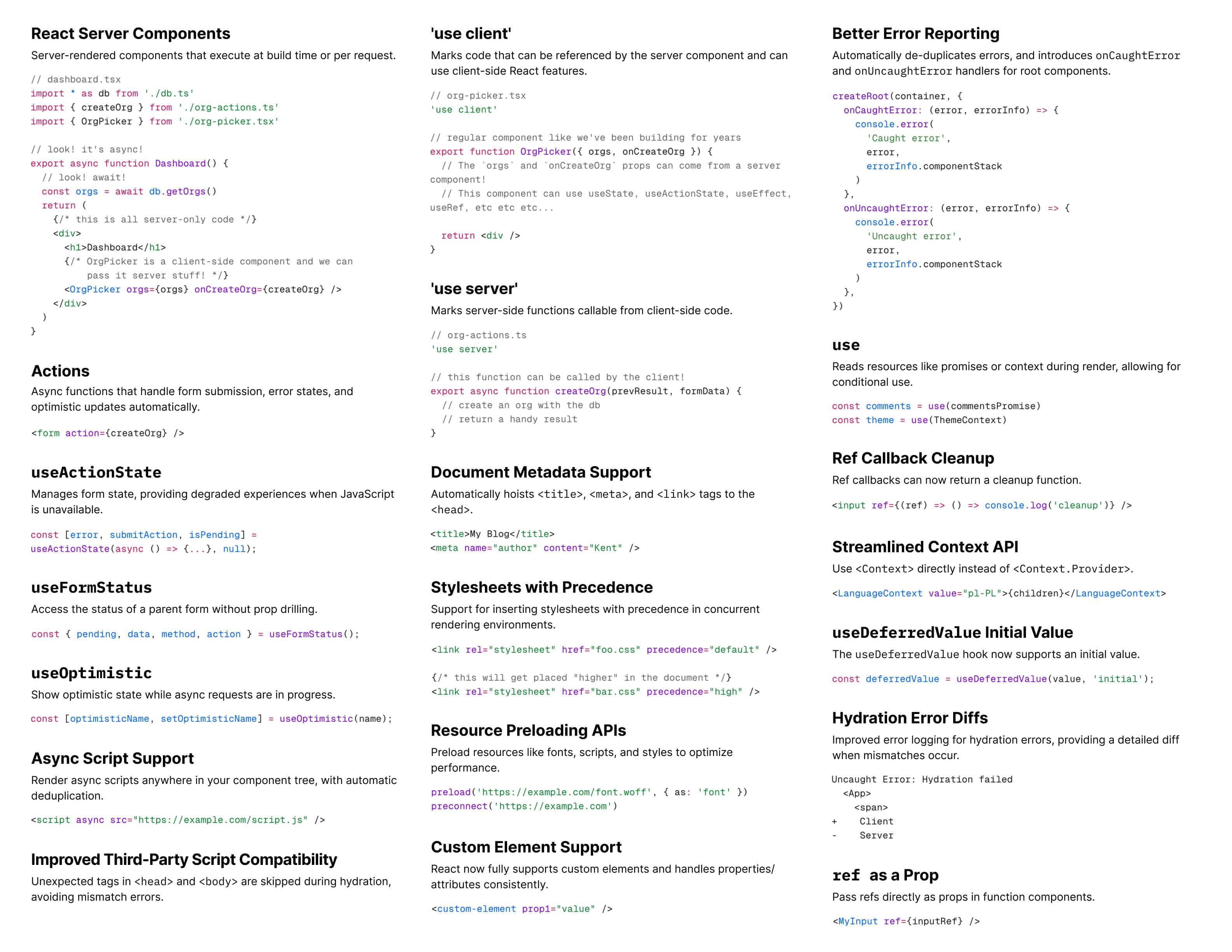
React Server Components
빌드 시간 또는 요청별로 실행되는 서버 렌더링 컴포넌트.
// dashboard.tsx
import * as db from './db.ts'
import { createOrg } from './org-actions.ts'
import { OrgPicker } from './org-picker.tsx'

// look! it's async!
export async function Dashboard() {
  // wait a sec!
  const orgs = await db.getOrgs()
  return (
    {/* this is all server-only code */}
    <div>
      <h1>Dashboard</h1>
      {/* OrgPicker is a client-side component and we can
          pass it server stuff! */}
      <OrgPicker orgs={orgs} onCreateOrg={createOrg} />
    </div>
  )
}
Actions
폼 제출, 오류 상태, 낙관적 업데이트를 자동으로 처리하는 비동기 함수입니다.
<form action={createOrg} />useActionState
폼 상태를 관리하며, JavaScript를 사용할 수 없을 때 저하된 경험을 제공합니다.
const [error, submitAction, isPending] =
  useActionState(async () => {...}, null);
useFormStatus
프롭 드릴링 없이 부모 폼의 상태에 접근합니다.
const { pending, data, method, action } = useFormStatus();useOptimistic
비동기 요청이 진행 중일 때 낙관적 상태를 표시합니다.
const [optimisticName, setOptimisticName] = useOptimistic(name);Async Script Support
컴포넌트 트리 어디에서나 비동기 스크립트를 렌더링하며, 자동 중복 제거 기능이 있습니다.
<script async src="https://example.com/script.js" />Improved Third-Party Script Compatibility
예기치 않은와내의 태그들은 하이드레이션 중 건너뛰어 불일치 오류를 방지합니다.
'use client'
'use client' 서버 컴포넌트에서 참조할 수 있고 클라이언트 측 React 기능을 사용할 수 있는 코드를 표시합니다.
// org-picker.tsx
'use client'

// regular component like we've been building for years
export function OrgPicker({ orgs, onCreateOrg }) {
  // The 'orgs' and 'onCreateOrg' props can come from a server component!
  // This component can use useState, useActionState, useEffect, useRef, etc etc...

  return <div />
}
'use server'
'use server' 클라이언트 측 코드에서 호출할 수 있는 서버 측 함수를 표시합니다.
// org-actions.ts
'use server'

// this function can be called by the client!
export async function createOrg(prevResult, formData) {
  // create an org with the db
  // return a handy result
}
Document Metadata Support
<title>, <meta>, <link> 태그를 자동으로 <head>로 호이스팅합니다.
<title>My blog</title>
<meta name="author" content="Kent" />
Stylesheets with Precedence
동시 렌더링 환경에서 우선순위가 있는 스타일시트 삽입을 지원합니다.
<link rel="stylesheet" href="foo.css" precedence="default" />
<!-- 이것은 문서에서 "높게" 배치될 것입니다 -->
<link rel="stylesheet" href="bar.css" precedence="high" />
Resource Preloading APIs
성능 최적화를 위해 폰트, 스크립트, 스타일과 같은 리소스를 사전 로드합니다.
preload('https://example.com/font.woff', { as: 'font' })
preconnect('https://example.com')
Custom Element Support
React는 이제 커스텀 엘리먼트를 완전히 지원하며 속성/어트리뷰트를 일관되게 처리합니다.
<custom-element prop1="value" />
Better Error Reporting
오류를 자동으로 중복 제거하고, 루트 컴포넌트에 대한 onCaughtError와 onUncaughtError 핸들러를 도입합니다.
createRoot(container, {
  onCaughtError: (error, errorInfo) => {
    console.error(
      'Caught error:',
      error,
      errorInfo.componentStack
    )
  },
  onUncaughtError: (error, errorInfo) => {
    console.error(
      'Uncaught error:',
      error,
      errorInfo.componentStack
    )
  },
})
use
렌더링 중 프로미스나 컨텍스트와 같은 리소스를 읽어 조건부 사용을 가능하게 합니다.
const comments = use(commentsPromise)
const theme = use(ThemeContext)
Ref Callback Cleanup
Ref 콜백이 이제 정리 함수를 반환할 수 있습니다.
<input ref={(ref) => () => console.log('cleanup')} />
Streamlined Context API
<Context.Provider> 대신 <Context>를 직접 사용합니다.
<LanguageContext value="pl-PL">{children}</LanguageContext>
useDeferredValue Initial Value
useDeferredValue 훅이 이제 초기값을 지원합니다.
const deferredValue = useDeferredValue(value, 'initial');
Hydration Error Diffs
하이드레이션 오류에 대한 향상된 오류 로깅으로, 불일치가 발생할 때 상세한 차이점을 제공합니다.
Uncaught Error: Hydration failed
<App>
  <span>
-   Client
+   Server
ref as a Prop
함수 컴포넌트에서 ref를 직접 prop으로 전달합니다.
<MyInput ref={inputRef} />